A recruitment CRM isn't just a database—it's your competitive advantage. Companies with well-managed talent pipelines fill positions 60% faster and make 40% better hires. Here's how to manage your recruitment CRM like a pro.
What is a Recruitment CRM?
A Recruitment CRM (Candidate Relationship Management system) helps you organize, track, and engage with candidates throughout the hiring process. It's the difference between reactive hiring and proactive talent acquisition.
Pipeline Stage Structure
The foundation of any recruitment CRM is well-defined pipeline stages.
Standard Pipeline Structure:
- Sourced: Candidates you've identified but haven't contacted
- Contacted: Initial outreach sent, awaiting response
- Engaged: Candidate responded and interested
- Screening: Initial phone screen scheduled or completed
- Interviewing: In active interview process
- Offer: Offer made, negotiating, or pending acceptance
- Hired: Offer accepted, hire complete
- Nurture: Good candidates not right now, stay in touch
Best Practice 1: Tag Everything — But Standardise How
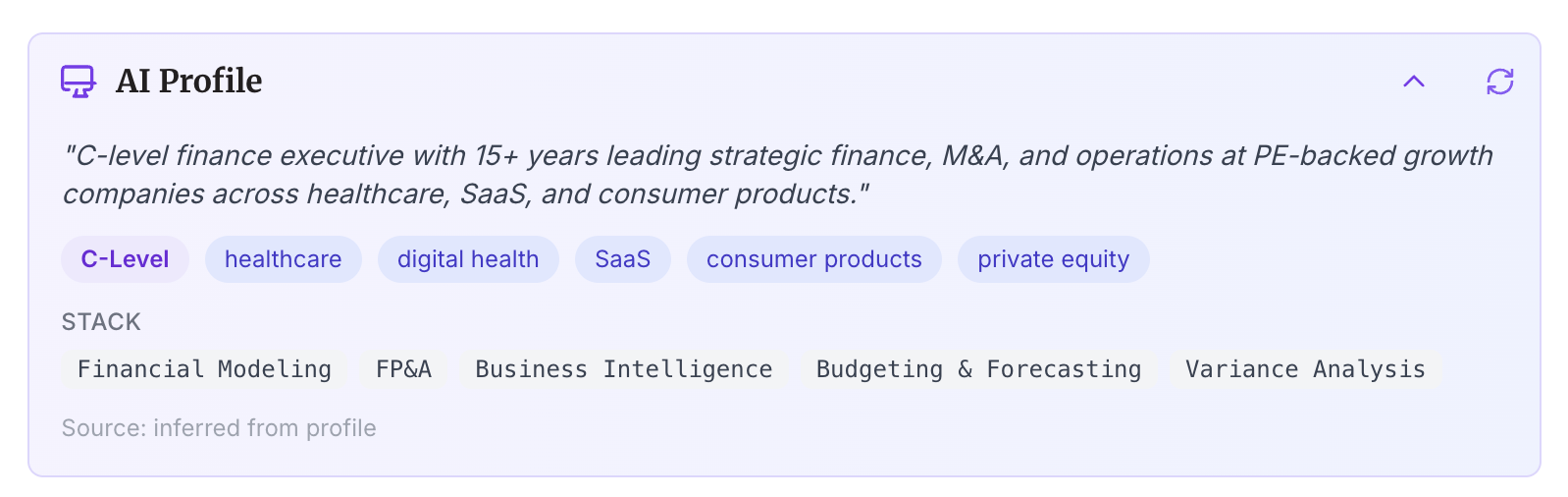
Tags make candidates searchable and enable powerful filtering. The problem in most agencies: one consultant tags a candidate “CFO”, another tags theirs “C-level Finance”, and a third uses “Chief Financial Officer”. When you search for CFOs, you find one consultant’s candidates and miss everyone else’s.
The solution is either a strict tag taxonomy enforced across your team, or a platform that generates tags automatically. MindHunt AI creates AI-generated tags from each candidate’s actual background when they’re added — so every CFO gets the same tags regardless of which consultant added them.
Essential Tag Categories:
- Skills: Python, React, AWS, Kubernetes, Machine Learning
- Experience Level: Junior, Mid, Senior, Lead, Principal
- Location Preference: Remote, SF Bay Area, New York, Flexible
- Industry Experience: FinTech, HealthTech, SaaS, E-commerce
- Availability: Immediate, 2-week notice, Passive
- Interest Level: Very Interested, Somewhat Interested, Just Exploring
- Source: LinkedIn, Referral, Inbound, Conference
Best Practice 2: Automate Status Updates
Manual status updates lead to outdated pipelines. Automate based on actions.
Automatic Triggers:
- Candidate responds to email → Move from "Contacted" to "Engaged"
- Phone screen scheduled → Move to "Screening"
- Interview scheduled → Move to "Interviewing"
- Offer sent → Move to "Offer"
- Offer accepted → Move to "Hired"
Best Practice 3: Implement Follow-Up Sequences
70% of positive responses come after follow-ups, yet most recruiters send only one email.
Standard Sequence:
- Day 0: Initial personalized outreach
- Day 3: Value-add follow-up (share article, company insight)
- Day 7: Different angle (career growth opportunity)
- Day 14: Final follow-up (stay in touch for future)
Best Practice 4: Candidate Scoring
Not all candidates are equal. Score candidates to prioritize your time.
Scoring Framework:
- Skills Match (0-10): How well do skills align with requirements?
- Experience Level (0-10): Right seniority for the role?
- Culture Fit Indicators (0-10): Company values alignment?
- Availability (0-10): Can they start when you need them?
- Engagement Level (0-10): How interested are they?
Total Score: 0-50 points
Priority Action: Focus on candidates scoring 35+
Best Practice 5: Nurture Passive Candidates
The best candidates aren't actively looking. Build relationships over time.
Nurture Cadence:
- Month 1: Initial connection + value add (article, insight)
- Month 2: Company update or industry trend discussion
- Month 3: Check-in on career interests/goals
- Quarterly: Share relevant opportunities or insights
- Annually: Career anniversary message
Best Practice 6: Build Talent Pools by Role
Don't wait until you have an opening. Build role-specific talent pools proactively.
Talent Pool Structure:
- Software Engineers - Frontend (100+ candidates)
- Software Engineers - Backend (100+ candidates)
- DevOps Engineers (50+ candidates)
- Product Managers (75+ candidates)
- Designers (50+ candidates)
- Data Scientists (50+ candidates)
Goal: When a position opens, you have 50-100 warm candidates ready to contact.
Best Practice 7: Track Engagement Metrics
Data-driven recruiting beats gut feeling every time.
Key Metrics to Track:
- Email Response Rate: Target 25-35%
- Phone Screen Show Rate: Target 85%+
- Interview-to-Offer Rate: Track by role
- Offer Acceptance Rate: Target 85%+
- Source Quality: Which sources produce best hires?
- Time in Each Stage: Identify bottlenecks
Best Practice 8: Set Reminders and Tasks
Never let a candidate go cold because you forgot to follow up.
Standard Reminders:
- Follow up 3 days after initial outreach
- Check in 1 week after phone screen
- Follow up 24 hours after interview
- Quarterly check-in for nurture candidates
- Anniversary messages for long-term relationships
Best Practice 9: Enrich Candidate Profiles
The more data you have, the better you can personalize and target.
Profile Enrichment Data:
- Full work history (not just current role)
- Education background
- Skills and certifications
- Verified contact information (email, phone)
- Social profiles (LinkedIn, GitHub, Twitter)
- Resume/portfolio
- Communication history and preferences
Best Practice 10: Give Clients Real-Time Pipeline Visibility
The Friday afternoon “any updates?” email is one of the biggest time drains in agency recruiting. Your client wants to know where their search stands — and you spend 30–45 minutes every week pulling together a status report they’ll skim for 30 seconds.
The better approach: give clients a live link to the pipeline. They can see candidate stages update in real time as you move people through the process. No report. No email. No call.
What Good Client Collaboration Looks Like:
- Real-time pipeline sharing: Client sees candidate progress without you sending anything
- Shared notes: Everyone sees candidate interactions and feedback
- Client contact tracking: Know exactly who the hiring manager, decision maker, and budget owner are — and have their direct details ready
- Placement-linked invoicing: When a candidate is hired, generate the invoice directly from the placement — pre-populated with candidate name, position, and your fee structure
- Document management: Store the client’s contract, NDA, and briefing docs in one place — not scattered across email threads
Best Practice 11: Keep Data Clean
A CRM full of outdated data is useless. Implement data hygiene practices.
Data Cleaning Rules:
- Archive candidates inactive >2 years
- Update status within 24 hours of any change
- Remove duplicate profiles
- Standardize naming conventions
- Regular audits (quarterly)
Best Practice 12: Use Kanban for Visualization
Visual pipeline management makes it easy to identify bottlenecks and balance workload.
Kanban Benefits:
- See candidate distribution across stages at a glance
- Identify stages with too many candidates (bottlenecks)
- Drag-and-drop makes status updates fast
- Color coding shows priority or candidate quality
- Team can see what everyone is working on
Common CRM Mistakes to Avoid
- Treating it like a spreadsheet: CRMs are for relationship management, not just data storage
- Inconsistent usage: If the team doesn't use it, it's worthless
- No follow-up system: Candidates fall through the cracks
- Too many manual steps: Automate repetitive tasks
- Not tracking metrics: Can't improve what you don't measure
- Outdated data: Garbage in, garbage out
- No talent pool building: Reactive hiring is slow hiring
ROI of Proper CRM Management
Companies with well-managed recruitment CRMs see:
- 60% reduction in time-to-hire
- 40% improvement in hire quality
- 50% reduction in cost-per-hire
- 85%+ offer acceptance rates (vs. 60-70% industry average)
- 3x more candidates engaged per recruiter
CRM Implementation Checklist
Week 1: Foundation
- Define pipeline stages
- Create tag taxonomy
- Set up user roles and permissions
- Import existing candidate data
Week 2: Automation
- Configure status update triggers
- Build follow-up sequences
- Set up automated reminders
- Integrate with email and calendar
Week 3: Process
- Train team on CRM usage
- Establish data entry standards
- Create collaboration workflows
- Set up reporting dashboards
Week 4: Optimization
- Review adoption metrics
- Gather team feedback
- Refine workflows
- Begin talent pool building
Conclusion
A recruitment CRM is only as good as your processes and discipline in using it. The companies that excel at recruitment don't necessarily have the most expensive tools—they have the best processes and team discipline.
Start with the basics (pipeline stages, tags, follow-ups), automate what you can, and continuously refine based on data. Your CRM should make recruiting easier, not more complex.
Related Resources
- Candidate Tracking Pipeline — Visual Kanban board for your entire hiring process
- AI-Powered Outreach — Automate follow-up sequences from your pipeline
- How to 3x Response Rates with Outreach Automation
- Recruitment Metrics & KPIs You Should Track
- AI Candidate Search — Fill your pipeline faster with AI-powered sourcing
Want a recruitment CRM designed for modern hiring? Try MindHunt AI for free.